Description
Build your strategy where your numbers live.
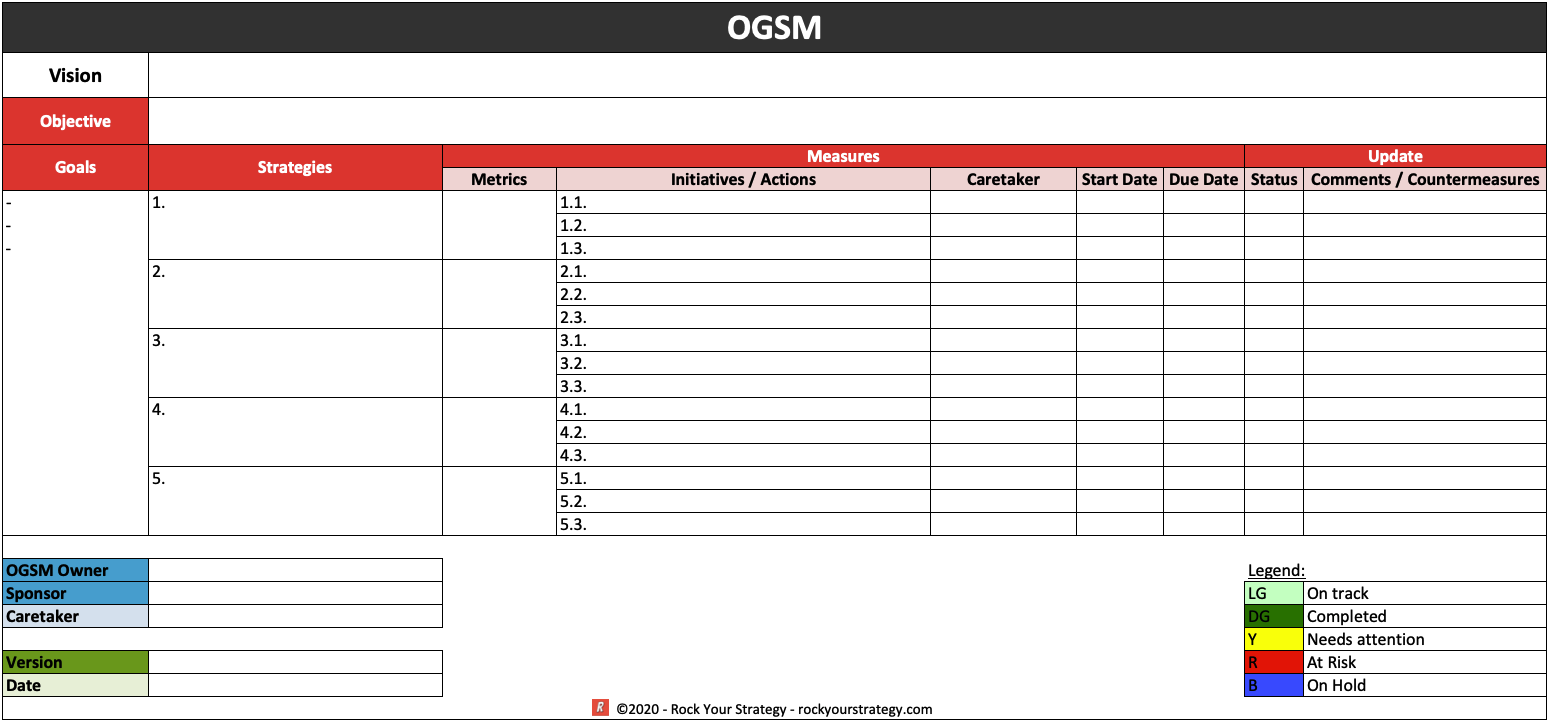
This pre-formatted OGSM template for Microsoft Excel gives you a structured spreadsheet layout for creating, developing, and tracking your one-page strategic plan — ideal for leaders who prefer to work with their strategy in a data environment where goals and measures can be quantified and updated over time.
What’s included
- A fully structured OGSM layout in Excel with dedicated sections for Objective, Goals, Strategies, and Measures
- Color-coded sections that make it easy to see which measures belong to which strategy
- Space for both quantitative KPIs and action-plan details within the Measures column
- Fully editable: all text, colors, and structure are customizable to your business
Who it’s for
Strategy managers, planning teams, and OGSM practitioners who want to build their OGSM in Excel — whether for ease of data entry, collaborative team editing, or because their Measures are closely tied to financial or operational tracking systems.
How to use it
Download, open in Microsoft Excel, and work through the template from left to right: Objective → Goals → Strategies → Measures. The Excel format makes it easy to update your strategy as it evolves. For a full guide to filling in each component, visit our Complete OGSM Framework Guide.
Why Excel rather than PowerPoint?
The Excel format shines for strategy building and ongoing tracking. When your Goals include financial targets and your Measures include KPIs with actual vs. target values, a spreadsheet environment makes more sense than a slide. Many teams use the Excel template for internal planning and the PowerPoint template for external communication — which is why we offer both as a bundle at 20% off.
Compatible with Microsoft Excel 2013 and later. Immediate download upon purchase.
Click “Add to Cart” to download and get started! Rock on!


Reviews
There are no reviews yet.